Le corpus se divise en "strates" représentant les diverses étapes de la création littéraire flaubertienne: scénarios, esquisses, brouillons, mise au net. Dans chaque "strate" l'utilisateur peut naviguer en cliquant sur les "icônes" affichées en haut de l'écran, au-dessus de la transcription diplomatique de chaque folio.
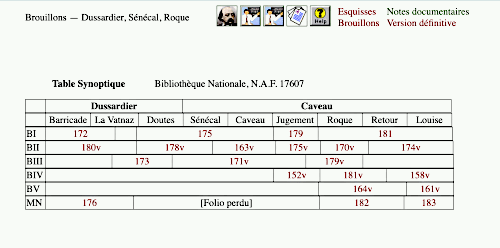
Pour accéder aux transcriptions, l'utilisateur dispose d'une table synoptique (ci-dessus) dans laquelle les numéros de folio sont arrangés de deux façons: horizontalement pour montrer l'agencement syntagmatique des folios qui couvrent l'épisode, et verticalement pour représenter les versions successives d'un passage particulier. Adaptation multimédiatique d'un outil établi de l'étude génétique, la table synoptique donne le classement des folios relatifs à un segment particulier, tout en donnant accès au moyen des numéros de folio sensibles à la touche aux transcriptions diplomatiques et aux fac-similés.
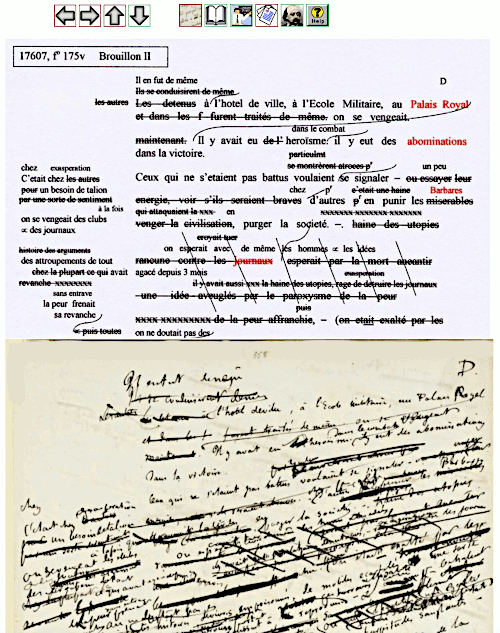
Chaque folio paraît dans un encadrement (frameset, ci-dessus). On peut s'en servir tel qu'il se présente, en faisant défiler la transcription et le fac-similé, ce qui permet de vérifier celle-là en la comparant systématiquement avec celui-ci, ou bien optimiser l'écran en modifiant la position de la barre horizontale, pour n'afficher que la transcription ou le fac-similé.
Les flèches sur la barre horizontale supérieure permettent de naviguer dans plusieurs sens :
 Ce bouton affiche le folio précédent dans la séquence
 Ce bouton affiche le folio suivant dans la séquence.
 Ce bouton affiche la version précédente du passage.
 Ce bouton affiche la version suivante du passage
 Ce bouton affiche une transcription linéarisée du folio
 Ce bouton affiche la version définitive du passage
 Ce bouton affiche un commentaire sur le passage
 Ce bouton affiche une table générale des folios relatifs au chapitre
 Ce bouton affiche l'accueil général
 Ce bouton affiche une table synoptique des folios relatifs à l’épisode
 Ce bouton donne accès au mode d’emploi
 Les liens rouges dans les transcriptions renvoient aux notes documentaires.
User's Guide
Version française
|
General Index
|
Homepage
The corpus is divided into "Strata" representing the various stages of Flaubert's literary production. The Scénarios contain his first outlines of plot and characters. The creative process begins in earnest in the Esquisses, and the Brouillons then provide evidence of intense efforts as regards the aesthetics and organisation the material. The Mises au Net represent the distillation of the material into a state resembling the final version, and this process of refinement is continued in subsequent stages leading up to the final version.
Within a "Stratum" of the main corpus (esquisses, Brouillons or Mises au Net), the user can navigate using the buttons which appear at the top of the screen above the diplomatic transcription of each folio.
The entry point into any given section is a
synoptic table
(above) which arranges the genetic material in two ways: the horizontal line/configuration gives the sequence or ‘run’ of folios covering the section at any given stage. The vertical configuration gives the successive drafts of any particular passage. (Note that the size of the box in which the folio number is place indicates the amount of ground covered). The synoptic table is our multimedia adaptation of an established tool of genetic studies; here, it efficiently combines the role of scholarly classification (visually representing the compositional ‘runs’ and the order in which different versions were drafted) with the provision of a touch-sensitive hypertext index. This index provides access to the main body of the package, namely the diplomatic transcriptions accompanied by facsimiles.
Each folio is represented by a
frameset
(above) which displays the transcription above the facsimile image. The frames can be resized by dragging the division bar up or down, thus maximising either the transcription window or that displaying the facsimile. The various arrows in the top-aligned toolbar allow navigation in different directions through the corpus . Horizontal arrows take the user to the previous or the next folio in any given ‘run’. The vertical arrows take the user to the previous or the following version in the succession of drafts of the same passage. Although the user is given considerable freedom to navigate in different directions, the genetic pathways themselves that are opened up need to have been carefully established in advance.
Within the frameset for each folio :
This button will display the previous folio in the sequence
This button will display the next folio in the sequence
This button will display the previous version of the passage
This button will display the next version of the passage
This button will display a linearised transcription of the folio
This button will display the final published version the passage
This button will display a commentary on the passage
This button will display the general index of folios of the chapter
This button will display the general reception
This button will display the synoptic table of the folios relating to the episode
This button displays the User’s Guide
 The red ‘hotspots’ in the transcriptions indicate links to documentary material.
Retour à la Table Générale